Bromptown: A Stylish Font for Modern Web Design
Recently, I was working on a boutique online store redesign. The client wanted something fresh, modern, and visually engaging that would stand out in a crowded market. After exploring several font options, I came across Bromptown—a stylish, handwritten brush script font that immediately caught my eye. It felt like the perfect fit for their brand’s personality.
A Visual Identity with Personality
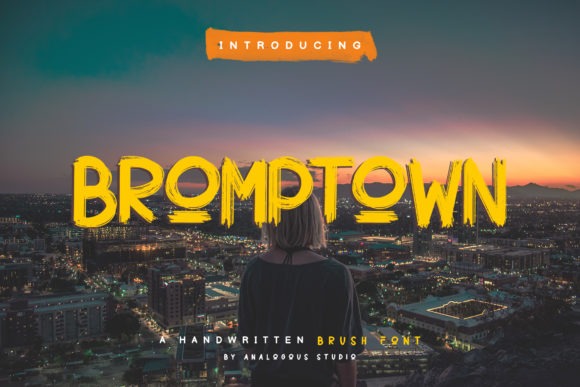
Bromptown is a display font with a distinct handwritten feel. Its brush script style gives it a sense of creativity and warmth, making it ideal for brands that want to convey a personal, artistic touch. The letterforms are fluid and elegant, with subtle variations that add character without overwhelming the reader. It’s not just about aesthetics—it’s about creating a visual identity that feels authentic and approachable.
I tested Bromptown in the hero section of the website, placing it over a high-quality image of their products. The contrast between the soft, flowing letters and the clean product shots created a harmonious balance. It worked well as a headline, drawing attention while maintaining readability. But I also knew that using a display font like Bromptown required careful consideration for other parts of the layout.
Readability and Layout Considerations
One of the first things I checked was how Bromptown performed on mobile devices. Since the site would be accessed by users on various screen sizes, I needed to ensure the font remained legible at smaller sizes. I resized the text and tested it on both light and dark backgrounds. While Bromptown looked great on a white background, I noticed that on darker sections, the contrast could become less clear. To address this, I adjusted the background color slightly and increased the letter spacing for better clarity.
For the call-to-action buttons, I used a lighter weight of Bromptown to maintain a consistent visual language. However, I avoided using it for body copy due to its decorative nature. Instead, I paired it with a simple sans serif font for the main content. This pairing allowed the display font to shine in key areas while ensuring the rest of the text remained easy to read.
Using Bromptown in Key Areas
Bromptown is versatile enough to work in multiple design contexts. In this project, I used it for the homepage header, product titles, and promotional banners. It added a touch of elegance to the logo and helped reinforce the brand’s creative vibe. For the blog section, I applied it to the headers and featured quotes, which enhanced the overall aesthetic without compromising usability.
On the course sales page, Bromptown was used for the title and subheadings. It helped create a sense of urgency and exclusivity, aligning with the premium feel of the product. I also experimented with using it as a decorative element in the footer, where it served as a subtle accent rather than the primary typography.
Font Pairing and Brand Consistency
When choosing fonts for a website, it’s important to consider how they complement each other. In this case, I paired Bromptown with a clean, modern sans serif font for body text. This combination created a balanced look—visually engaging yet professional. The contrast between the two fonts made the content more scannable, which is crucial for user experience.
For the digital brand kit, I included Bromptown alongside a few other fonts that could be used across different platforms. This ensured consistency in branding while allowing flexibility for various design needs. It’s always good to have a few reliable fonts that can be used in different contexts without losing the brand’s identity.
Technical and Licensing Considerations
Before implementing Bromptown on the live site, I made sure to check its technical specifications. It comes in several weights and styles, including uppercase multilingual support, which is a plus for international audiences. I also verified that it’s available as a webfont, which means it can be easily integrated into any website without performance issues.
Licensing is another important factor. Since the client was building an online store, I confirmed that Bromptown’s commercial license allowed use on websites and landing pages. This gave me peace of mind knowing that the font would be legally compliant and suitable for long-term use.
Final Thoughts on Bromptown
Bromptown is more than just a font—it’s a design tool that can elevate a website’s visual appeal while maintaining readability and usability. Whether you’re designing a portfolio, a course sales page, or a boutique shop, Bromptown offers a unique blend of style and functionality. It’s a great choice for designers who want to create a strong brand presence without sacrificing user experience.
By carefully considering its use in key areas and pairing it with complementary fonts, you can make the most of Bromptown’s distinctive character. It’s a font that speaks to creativity, professionalism, and modern design principles—perfect for any digital project that wants to stand out in a competitive market.